The following charts will help when designing forms with bar codes that will be read by imaging systems from Acordex. Allow a space as shown in the charts.
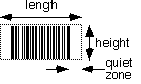
Code 25 is numbers only (each character is 0 thru 9).
Minimum space when document will be scanned:
| # digits of data don't count start/stop characters |
length (in) | height (in) |
| including quiet zone | ||
| 4 | 0.9 | 0.2 |
| 6 | 1.2 | 0.3 |
| 8 | 1.5 | 0.3 |
| 10 | 1.8 | 0.4 |
| 12 | 2.1 | 0.4 |
| 14 | 2.4 | 0.5 |
The width numbers include planning for the quiet zone, which must be 3/16" or more on both sides of the bar code. There is no space required above or below the bars.
Code 39 can include upper case letters, numbers and limited punctuation.
Minimum space when document will be scanned:
| # characters of data don't count start/stop characters |
length (in) | height (in) |
| including quiet zone | ||
| 4 | 1.3 | 0.3 |
| 6 | 1.7 | 0.4 |
| 8 | 2.1 | 0.5 |
| 10 | 2.5 | 0.6 |
| 12 | 2.9 | 0.7 |
| 14 | 3.3 | 0.8 |
The width numbers include planning for the quiet zone, which must be 0.11 in or more (~1/8") on both sides of the bar code. There is no space required above or below the bars.
The limit for these bar codes is the planned resolution setting for the scanner. For most high volume document applications, this is 200 dpi (.005 in). This means a narrow bar should be at least .010 in. wide, and the thick bars must be 2x to 3x as wide.
If a black bar is at or smaller than 1/200 of an inch, scanning at 200 dpi will miss it, or will miss the adjacent white bar. This makes the bar code unreadable. Ensure that a narrow bar is at least twice as wide as the planned resolution setting for the scanner.
Always test bar code stickers before printing your volume run!
Details for implementing the bar codes, confirming their accuracy and calculating check characters are contained in the following two documents.